If a customer is going to trade in a used unit and use it towards the purchase of a new unit, the recommended trade in process would be as follows:
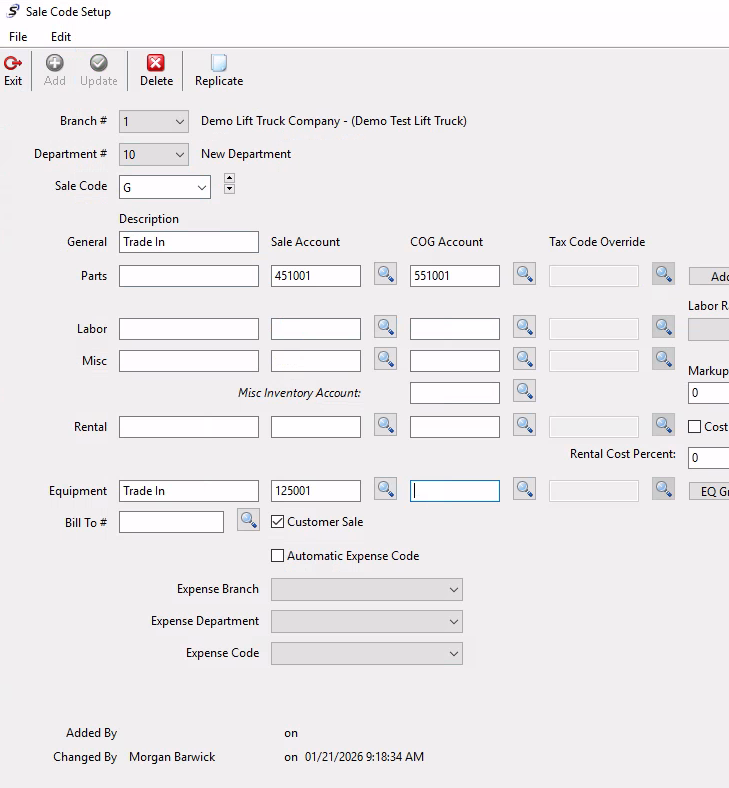
First, you will need to have a sale code created within the sale code setup module that directs the system where to post the trade in unit balances. Example below for a sale code that posts the used equipment trade-in to the used inventory account. Only a sale account is needed as there is not a cost or inventory on a customer trade-in.
Then, you will need to ensure that the unit you are going to receive from the trade in has a valid equipment record set up in the system. Typically it will be assigned to the used equipment department.
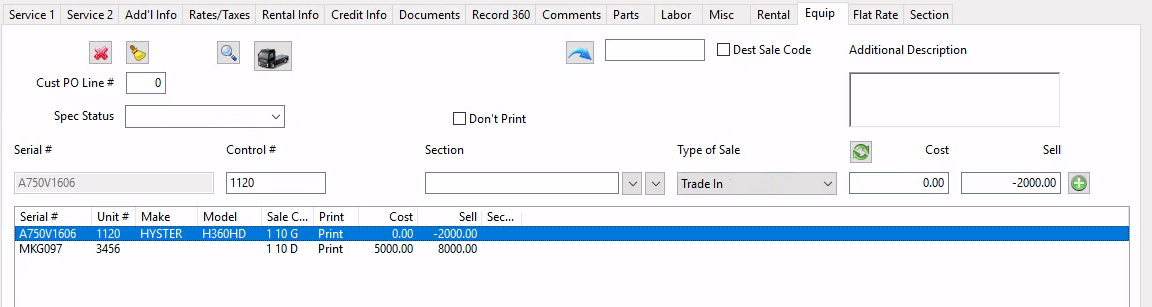
Change the type of sale to be trade-in on the trade in line on the work order, and then put a negative value in the sell field (the amount you are giving them). Add that to the sales order and the trade-in will be accounted for. You can then sell the new equipment item as needed.
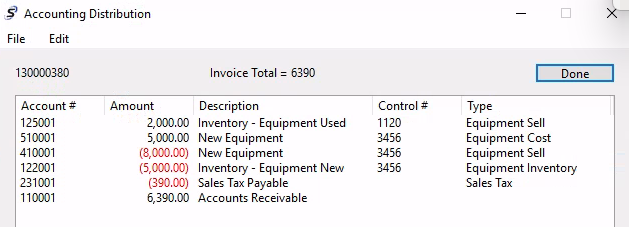
Your sale order will subtract the trade-in amount from the invoice total and add it to your inventory.
Was this article helpful?
That’s Great!
Thank you for your feedback
Sorry! We couldn't be helpful
Thank you for your feedback
Feedback sent
We appreciate your effort and will try to fix the article