You can update the labor rate amounts assigned to your labor rates in the labor rate setup. This is set up under Administration > Labor Rate Setup.
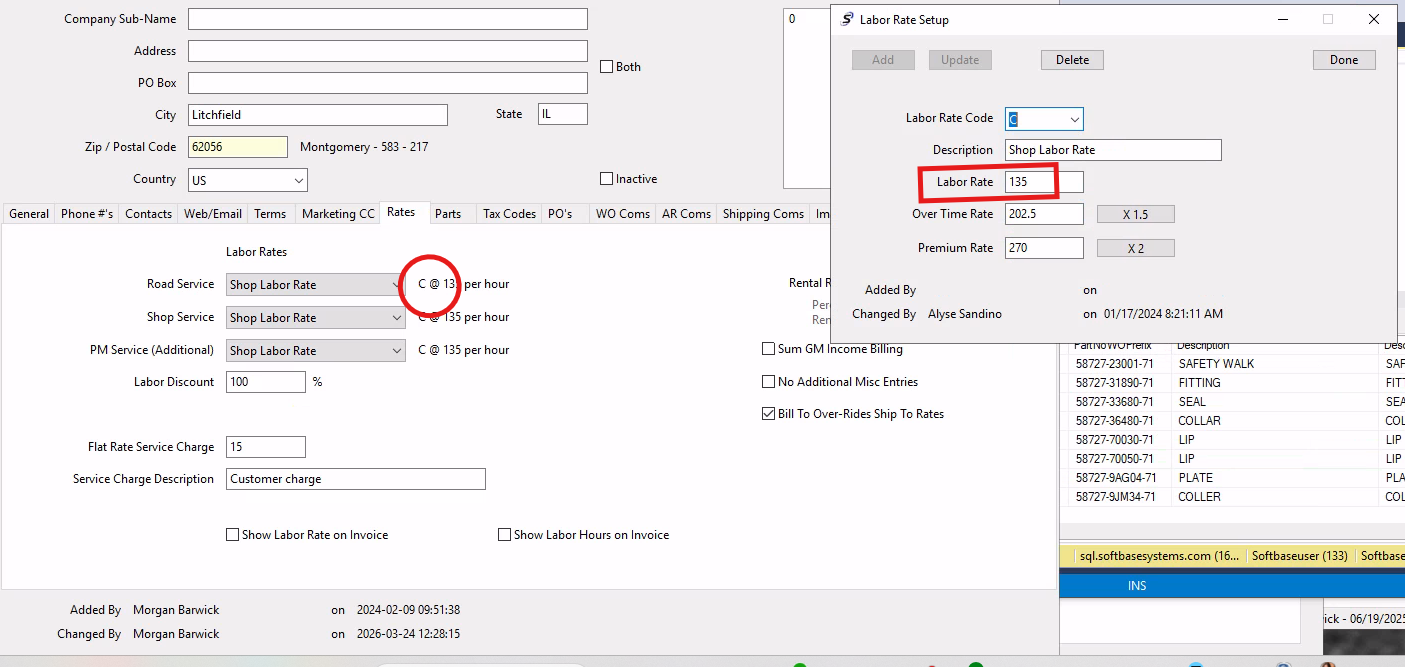
You would want to select the labor rate used for your customers (in the screenshot below labor rate code C is used on the customer record, "Shop Labor Rate"), and then pull that record up in the labor rate setup. You will update the labor rate as needed, then click update.
This will update the amount for that labor rate on the customer record, and any customer assigned to that labor rate will have the amount updated on their account based on that labor rate setup record.
Was this article helpful?
That’s Great!
Thank you for your feedback
Sorry! We couldn't be helpful
Thank you for your feedback
Feedback sent
We appreciate your effort and will try to fix the article