Sometimes a customer would like a recap of work performed by the technician that was on site, even if the work has not yet been completed.
The tech can use the "customer signature" option to generate a recap for the work that can then be emailed.
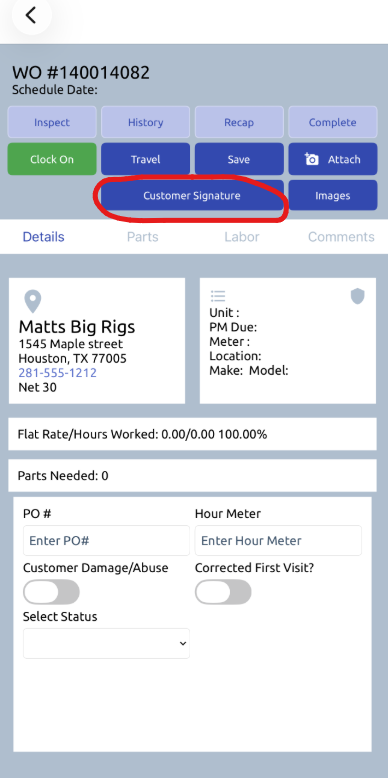
From the work order, choose "customer signature"
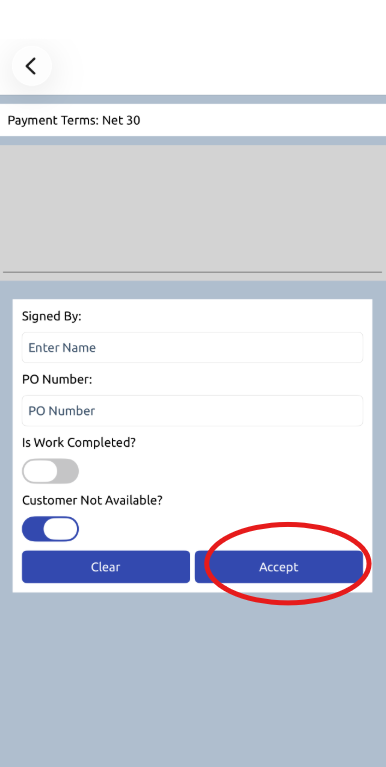
Then, either have the customer sign for the work done that day or choose "customer not available" - They would need to ensure that they do not mark the work order as complete when utilizing that process to keep the work order open in their dispatch view to access again later. Otherwise, they can also flag the work as complete to move the work order to a completed status. Then, hit accept.
The user can then save the recap to their phone, send it to the document center, or email it to the customer and they will have the record or work completed for that day. The work order will remain open in dispatch as "work not complete" for future work entries.
Was this article helpful?
That’s Great!
Thank you for your feedback
Sorry! We couldn't be helpful
Thank you for your feedback
Feedback sent
We appreciate your effort and will try to fix the article