Overview
The CRM Leads Import allows users to create multiple leads by uploading an Excel spreadsheet. To complete the import successfully, the workbook must follow the required column order, field limits, and validation rules outlined below.
The importer maps information based on each column’s position, not the column header name. The user should not add, remove, or rearrange columns in the template.
Download the Template
Use the following template attached bellow for preparing leads for import:
File Requirements
The import file must meet the following requirements:
- Supported file types:
.xlsx - Maximum file size: 5 MB
- Use the first worksheet in the workbook
- Row 1 must contain the column headers
- Lead data must begin on row 2
- The file must contain exactly 18 columns in the expected order
- The user should not add, remove, or rearrange columns in the template.
All fields should be imported as text. Phone numbers, ZIP codes, extensions, and PO boxes can be formatted as Text in Excel to preserve leading zeros and prevent Excel from changing the values.
Expected Column Layout
| Column | Template Header | Required | Maximum Length | Requirements |
|---|---|---|---|---|
| A | Company Name | No | 255 | Recommended for identifying the lead. |
| B | Phone | Conditional | 50 | Either Phone or Company Email must be provided. |
| C | Company Email | Conditional | 50 | Either Phone or Company Email must be provided. Must contain a valid email address when populated. |
| D | Website | No | 100 | Enter the company website, when applicable. |
| E | Company Address | No | 125 | Company street address. |
| F | Country | No | 100 | |
| G | City | No | 100 | Company city. |
| H | StateProvince | No | 100 | State, province, or regional information. |
| I | ZipCode | Yes | 50 | A ZIP or postal code is required for every row. |
| J | PoBox | No | 100 | Format as Text to preserve the original value. |
| K | ContactName | No | 50 | Used with Company Name for duplicate checking. |
| L | ContactPosition | No | 50 | The contact’s position or job title. |
| M | ContactPhone | No | 50 | This field does not satisfy the Phone or Company Email requirement. |
| N | ContactExtention | No | 50 | The contact’s phone extension. |
| O | ContactCelphone | No | 50 | The contact’s mobile or cell phone number. |
| P | ContactFax | No | 50 | The contact’s fax number. |
| Q | ContactPager | No | 50 | Imported into the lead’s Additional Phone Number field. |
| R | ContactEmail | No | 50 | The contact’s email address. |
Required Fields
Each imported row must include:
- A ZIP Code
- Either a Company Phone or Company Email
The following condition will cause the import to fail:
- Company Phone is blank and Company Email is blank
- Or ZIP Code is blank
Contact Phone and Contact Email do not replace the Company Phone or Company Email requirement.
Valid example
Duplicate Lead Validation
The importer checks for existing leads using the following combination:
Company Name + Contact Name
When both fields are populated and the same combination already exists in CRM, the upload may fail.
Before importing, review the file for:
- Duplicate Company Name and Contact Name combinations within the workbook
- Leads that may already exist in CRM
- Leading or trailing spaces that could affect duplicate comparisons
Company Name by itself is not used for this duplicate check. Contact Name by itself is also not used.
Importing the File
- Open CRM.
- Navigate to Leads.
- Select Import Leads.

- Select the file.
- Select the required Lead Source.
- Select an Assigned User
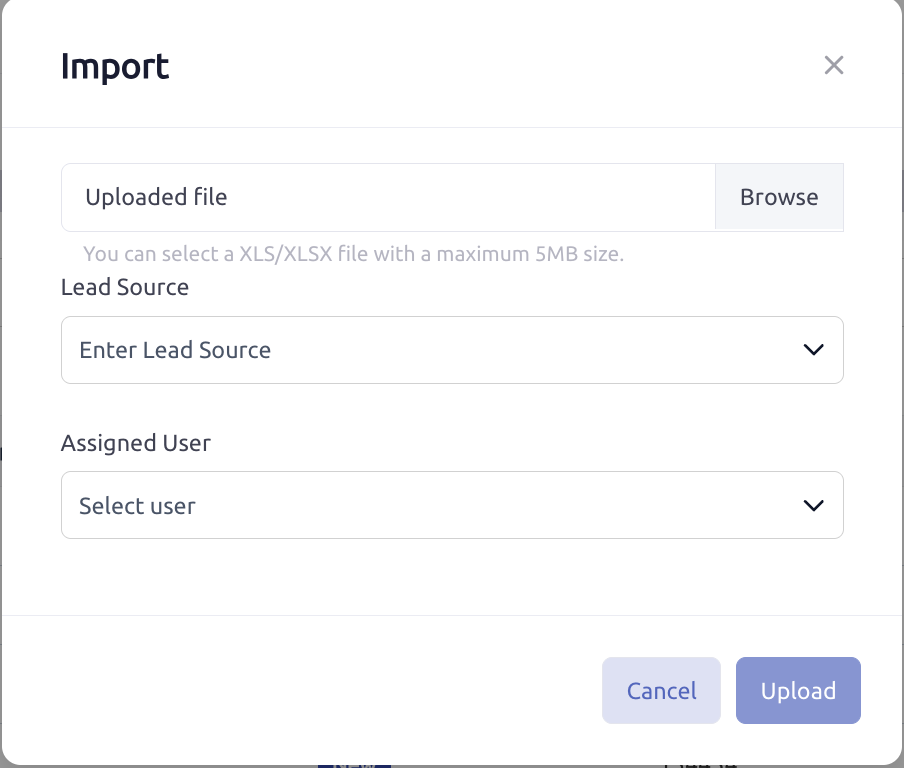
- Click Upload.
- Review the imported leads after the upload completes.
Troubleshooting Import Errors
When the system displays an error asking you to review the file, check the following items:
- Every row contains a ZIP Code
- Every row contains either a Company Phone or Company Email
- Company Email values contain valid email addresses
- No field exceeds its maximum length
- Email addresses are 50 characters or fewer
- The workbook contains exactly 18 columns
- Columns have not been rearranged
- There are no blank formatted rows after the data
- Country names do not contain extra spaces
- Company Name and Contact Name combinations do not already exist
Because an invalid row can cause the entire upload to fail, correcting or removing the affected row may be necessary before retrying the import.
Was this article helpful?
That’s Great!
Thank you for your feedback
Sorry! We couldn't be helpful
Thank you for your feedback
Feedback sent
We appreciate your effort and will try to fix the article