Softbase does not save or store any printer settings or configurations internally.
When a user prints, the application retrieves the available printers and their settings from the operating system of the local machine or the server hosting the application.
Because of this, printer options such as the default printer, paper trays, or other configurations are determined by the system-level printer setup, not the application.
If a printer is missing or printing incorrectly, the issue should be checked in:
- The local computer’s printer settings
- The server or hosted environment
- The network printer configuration
Any printer changes must be made at the system level, since the application simply uses the printers that the machine or server already has configured.
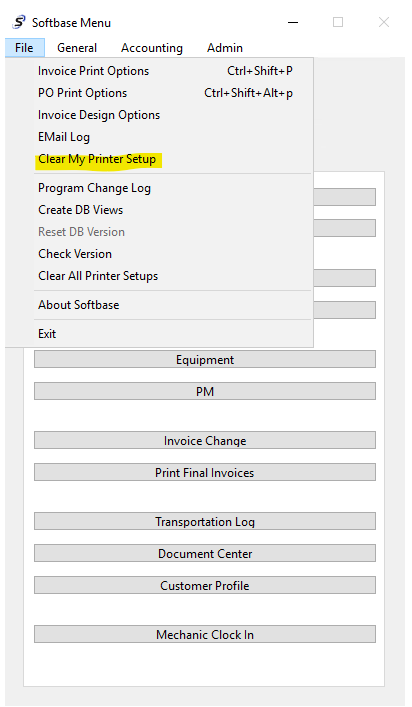
The only items that will save within Softbase are the default page setups by report. These can be reset by choosing the File Menu of Softbase, using the "Clear My Printer Setup" option.
This will reset any saved page setups such as your margins will be reset, so you will want to pay attention to the page setup and default margins after using this option to reset the print settings as needed.
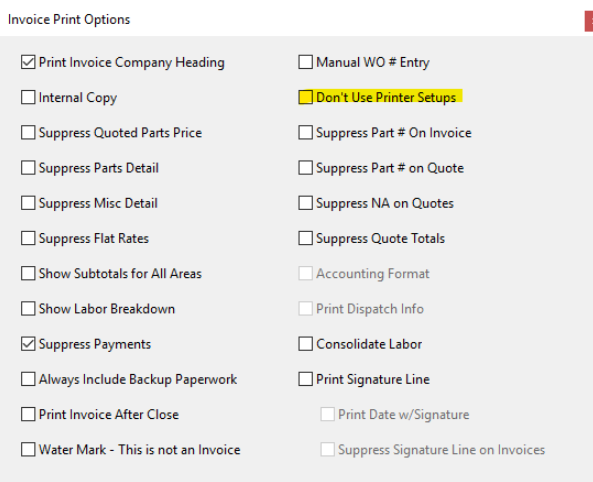
You can also elect to never store the page setups by user by checking the option to "Don't use printer setups" in your invoice print options as well. That option is located in the invoice print options under the main file menu of Softbase and is set by user.
Additionally, we suggest that printers that are used with Softbase have Universal PostScript print drivers installed as opposed to a PCL print driver, as we see better compatibility with those.
Was this article helpful?
That’s Great!
Thank you for your feedback
Sorry! We couldn't be helpful
Thank you for your feedback
Feedback sent
We appreciate your effort and will try to fix the article