Invoicing Page Enhancements
Based on customer feedback in Evolution 4.1.9, we have enhanced the Invoicing page to make it easier to return to recently viewed documents and locate documents by status.
Recent Documents
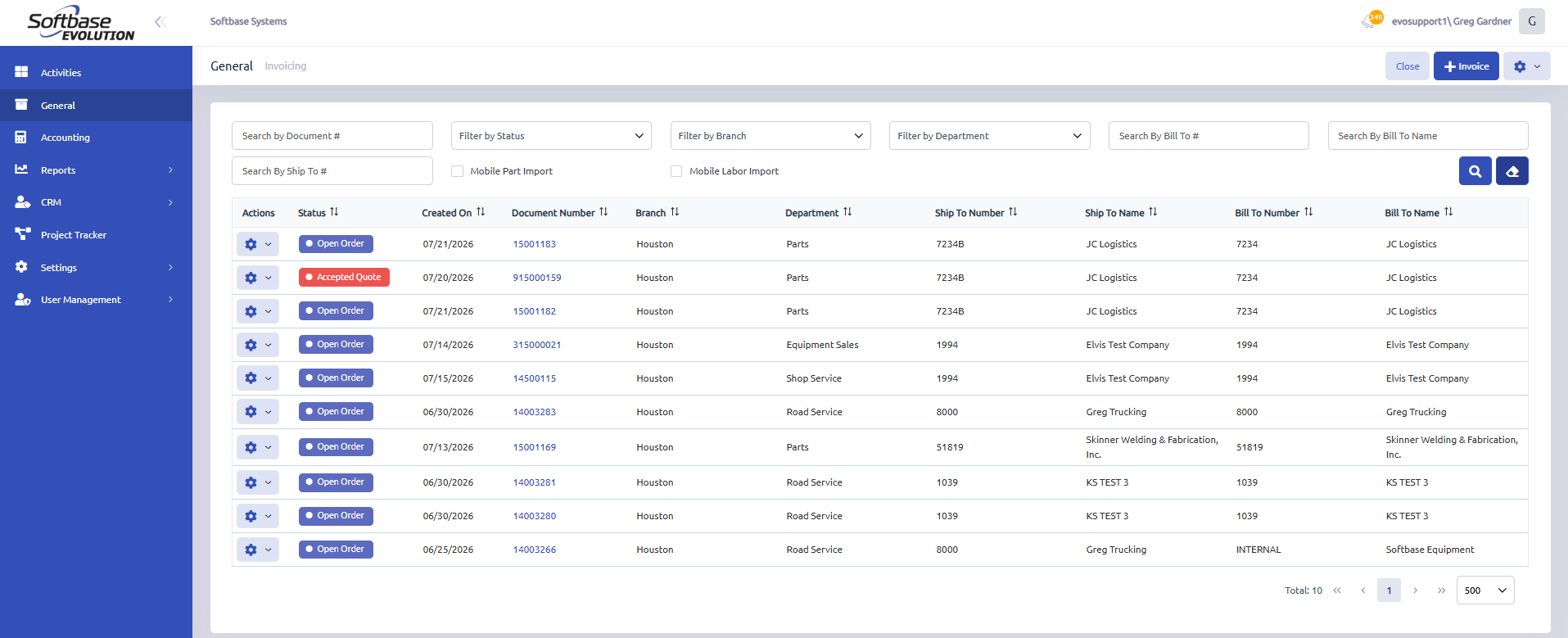
When the Invoicing page is opened, the grid now displays the 10 most recent documents viewed by the current user.
This provides quick access to documents you have recently worked with without requiring you to perform another search.
Document Status
The document's current status is now displayed directly in the results grid. Examples may include:
- Open Order
- Accepted Quote
- Invoiced
- Open Quote
- Cancelled Quote
A new Filter by Status option has also been added, allowing you to search for documents with a specific status.
Searching for Open Documents
The existing search functionality remains unchanged.
To display all open documents:
- Leave all search fields and filters blank.
- Select the magnifying glass search button.
The grid will return all open documents available to the user.
Clearing the Search
Select the Clear icon next to the search button to remove all entered search criteria and filters.
After the search is cleared, the grid will return to displaying your 10 most recently viewed documents.
Was this article helpful?
That’s Great!
Thank you for your feedback
Sorry! We couldn't be helpful
Thank you for your feedback
Feedback sent
We appreciate your effort and will try to fix the article